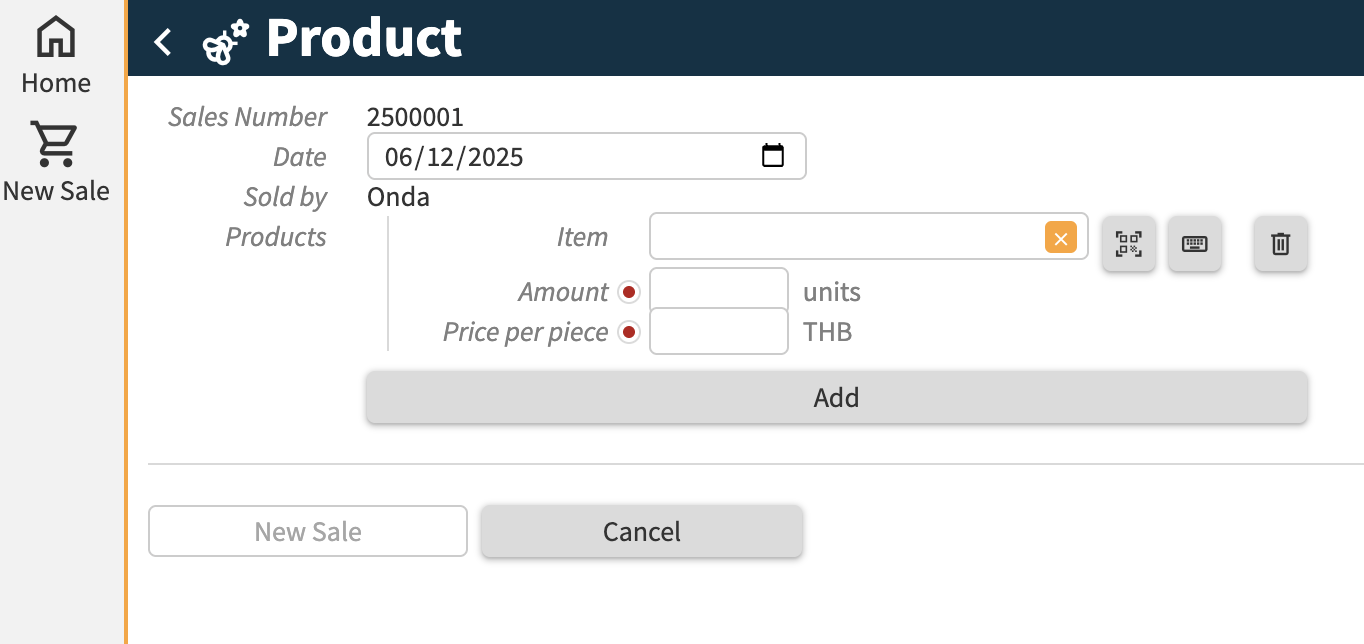
I am currently working on a handheld PoS system. Each item of the products will have it’s own barcode. I wish this part in the annotations to scan the barcode: ‘Item’: text @scanscan using: .‘UID’. Where to place @qrcode? (Edit: I decided to go with qrcodes instead)
The result I am currently getting is the following:
Application:
'New Sale': command {
	'Sales Number': text @expected: to-text 'index' ^ .'Next Sales Number'
	'Products': collection ['Item'] {
		'Item': text -> ^ ^ .'Products'[]
		'Amount': number 'units'
	}
} as $ => update .'Sales' = create (
	'Sales Number' = $ .'Sales Number'
	'Products' = walk $ .'Products'* as $ (
		create (
			'Item' = $ .'Item'
			'Amount' = $ .'Amount'
		)
	)
)
Annotations:
handheld: 'start' details (
	title: icon:"spa", 'Onda'
	-> inline view: command (
		title: icon:"shopping_cart", 'New Sale'
		view: command: 'New Sale' (
			'Products': collection (
				'Item': text @scan using: .'UID'
			)
		)
	)
)
Apparently it is not possible to use the ‘Scan’ button to open the scanner within a collection in a command. (Products [‘Item’])
By looking at an examples by Paul, I managed to work around by adding a scanlog to a user. That collection is used as a default when calling the ‘New Sale’ command.
Application
'Users': collection ['Name'] {
	'Name': text
	'Type': stategroup (
		'Admin' { }
		'Unknown' { }
	)
	'Scanlog': collection ['Product'] {
		'Product': text -> downstream ^ ^ .'Products'[]
		'Quantity': number 'units'
		'Retail Price': number 'baht' = >'Product'.'Retail Price'
		'Value': number 'baht' = product ( .'Quantity' as 'units', .'Retail Price' )
		'Remove': command { } => update ^ .'Scanlog' = delete
	}
	'Total Value Scanlog': number 'baht' = sum .'Scanlog'* .'Value' @hidden
}


'New Sale': command {
	'Sales Number': text @expected: to-text 'index' ^ .'Next Sales Number'
	'Date': number 'date-time' @expected: now
	'Sold by': text -> ^ .'Users'[] @expected: user .'Name'
	'Products': collection ['Item'] @default: .'Item'&'scan' {
		'Item': text -> ^ ^ .'Products'[]
			where 'scan' ~> ^ >'Sold by'.'Scanlog'[]
		'Quantity': number 'units' @default: .'Item'&'scan'.'Quantity'
		'Price per piece': number 'baht' @expected: >'Item'.'Retail Price'
	}
} as $ => update .'Sales' = create (
	'Sales Number' = $ .'Sales Number'
	'Date' = $ .'Date'
	'Sold by' = $ .'Sold by'
	'Products' = walk $ .'Products'* as $ (
		create (
			'Item' = $ .'Item'
			'Amount' = $ .'Quantity'
		)
	)
) => update .'Next Sales Number' = sum ( .'Next Sales Number', 1 )
I am now trying to figure out how to show only the scanlogs by the user within the handheld. Does anybody have a solution?
Annotations
	handheld: 'New Sale' details (
		title: icon:"shopping_cart", 'New Sale'
		-> label: 'Seller'
		-> inline view: command (
			title: icon:"shopping_cart", 'Scan'
			view: @scan ( .'Products' [] using: .'UID' ) command: 'Scan Product' @auto-execute ( ) details (
				title: icon:"qr_code_scanner", 'Add Product'
				-> label: 'Products'
			)
		)
		-> label: 'Products'
		-> inline view: collection (
			path: root  .'Users'[] .'Scanlog' [] @no-header //--> this shows all scanlogs, correct? How to show only the one the user scanned?
			title: .'Product'
			'Quantity': .'Quantity'
			'Price': >'Product'.'Retail Price'
			view: command: 'Remove' ( )
		)
		-> inline view: command (
			title: icon:"check", 'Finish'
			view: command: 'New Sale' (
				'Products': collection (
					'Item': text @scan using: .'UID'
				)
			)
		)
	)
Hi Martinique,
There are two ways to ‘scope’ the data to the current user:
- work from a user or session ‘node’ in the application and show lists based on that.
- use user rights to limit the data a user can see
The first gives the freedom to see data from other users, it just usually does not do so. It requires more modelling work.
The second one really prevents other users from seeing another user’s - no flexibility there. It does easily allow an admin to see everything, though.
Regards, Rick
1 Like
Good morning Rick!
How to work with this user node?
A visualisation of what I would like to achieve I coded in the annotations:
handheld: 'Split Today' details (
	title: icon:"chevron_right", 'Split Today'
	-> inline view: user .'Type'?'Service Provider'>'Service Provider'>'Split Today' collection (
		path: .'Service Orders' []
	)
)
I wish the handheld to display the service orders corresponding to today’s split for a specific service provider. Which service provider is logged in is defined in user .’Type’?’Service Provider’ { ‘Service Provider’: text → […] .’Service Providers’ }
Any tips? 
Hi Martinique, my tips would be to:
-
When the user should be able to see all, but usually needs to see data of one provider: use a list of service providers to choose from and show the data for each provider when you click on them. Use the landing page to open the right provider directly if that is where a user should start
-
When the user should only be able to see the data of one provider: use user rights
1 Like