Ok, you will need to add the following in deployment.alan:
Replace the part with brackets [ and ] by the right url
	'mailer'
		configuration: 'default'
			'texts'    = (
				'files resource server url' = "https://[server-url of your application]"
			)
			'integers' = (
				'test' = 0
			)
			'verbose'  = 'on'
		instance-data: local
		schedule: never
And add a folder /mailer in the /systems folder in the deployment folder
Then add a folder /instance within that new folder
And then create a file values.json in that folder with these contents:
Replace the parts with brackets [ and ] by the right data
{
	"values": {
		"passwords": {
			"type": [
				"text",
				{
					"value": "{\"[from-email-address]\":\"[smpt-server-password]\"}"
				}
			]
		},
		"test": {
			"type": [
				"integer",
				{
					"value": 0
				}
			]
		}
	}
}
In the processor.alan there is a hard-coded “smtps://smtp-relay.gmail.com” that says you will be using the gmail smtp server. You can also change that. The from address and password will have to be known at that smtp server.
Thank you for bearing with me, im very grateful for all the help. I dont know how you didnt get annoyed by me.
Hi, thanks for acknowledging that this takes patience. 
The thing is: I am glad you are putting in the effort to learn Alan and I understand that the documentation is not fully up to the job yet. So it is only logical you need help.
I would recommend to:
- look through the documentation and tutorials, including all the example applications in your environment to get the best understanding possible.
- learn a bit about how the reference documentation for each of the languages should be read, because with that you can figure out a lot on your own as well.
- use the language server / compiler in your IDE as a companion, telling you what is incorrect and showing you options for solutions as much as possible
I should also add that creating an interface to a third party system like this, with authentication, is one of the harder parts of writing alan applications, because you touch upon a lot of different parts of the platform. If for instance you make changes only in the application model, it is much easier, because it doesn’t require new files / folders etc.
Good luck! Rick
Out of curiosity, if i decided to move the mailer system as a sub-tab to a section for example users how would i need to modify the code?
You can place one or more properties in a group. Syntax: 'group name': group { /* properties */ }
If you want to have the group outside of the normal user interface for properties (in a separate tab), you can annotate it with @breakout, so: 'group name': group @breakout { /* properties */ }
so in my case something like this: 'Mails': group { /*properties*/ }
Yes and then move the properties in the group that you would like to see there. And update all paths to and from these properties accordingly.
To update the paths I suppose that before .‘Mails’ youll have to put .‘Users’
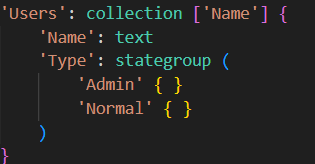
Yes. I must add that if Users is a collection, that means that you will have a ‘Mails’ group per user. And if you had a reference to something in the ‘Mails’ group, you will need a link to a specific user to get to the same property in the ‘Mails’ group under ‘Users’
Yes, that’s actually my goal. Making a dedicated mail section under each user so I can much easily send emails to “clients” but thanks for clarifying
Also let’s say that mails remains a separate tab what if i want to make the sender and then recipient a drop-down menu with the users. For the sender everything is ok but with the recipient it gives off an error if I try and make it so because there is some sort of validation there
You’ll have to add the code and error message (printscreen e.g.). In addition: when sending and receiving e-mails, it is not very common to require them to be users of your system. So usually it is another collection of ‘Relations’ or . ‘Relations’ . ‘Contact Persons’
So, i tried adjusting the path to it
but it gives off an error claiming to not be in properties
Anything i need to change here:
Tried that but it resulted in the error I mentioned above
Hi, in your code example, there should be a Users collection in the same node as ‘Recipients’. My guess is the recipients collection is defined in the node of a ‘Mails’ collection. If that is the case, the path to users should at least be: ^ ^ . 'Users'[] (please note that the ^ means: go up one node context)
understandable, so its like it now it can search for collections etc one scope up. Also you are an absolute life saver <3
1 Like